Measure TikTok Mini Games in three layers: first entry with Active, return play with Launch, and monetization with paid and organic Day X ad-revenue ROAS. Before comparing campaigns, lock the account time zone and choose either the 24-hour Day X window or the calendar-day window. Mixing the two creates a false comparison.
What questions do Active and Launch answer?
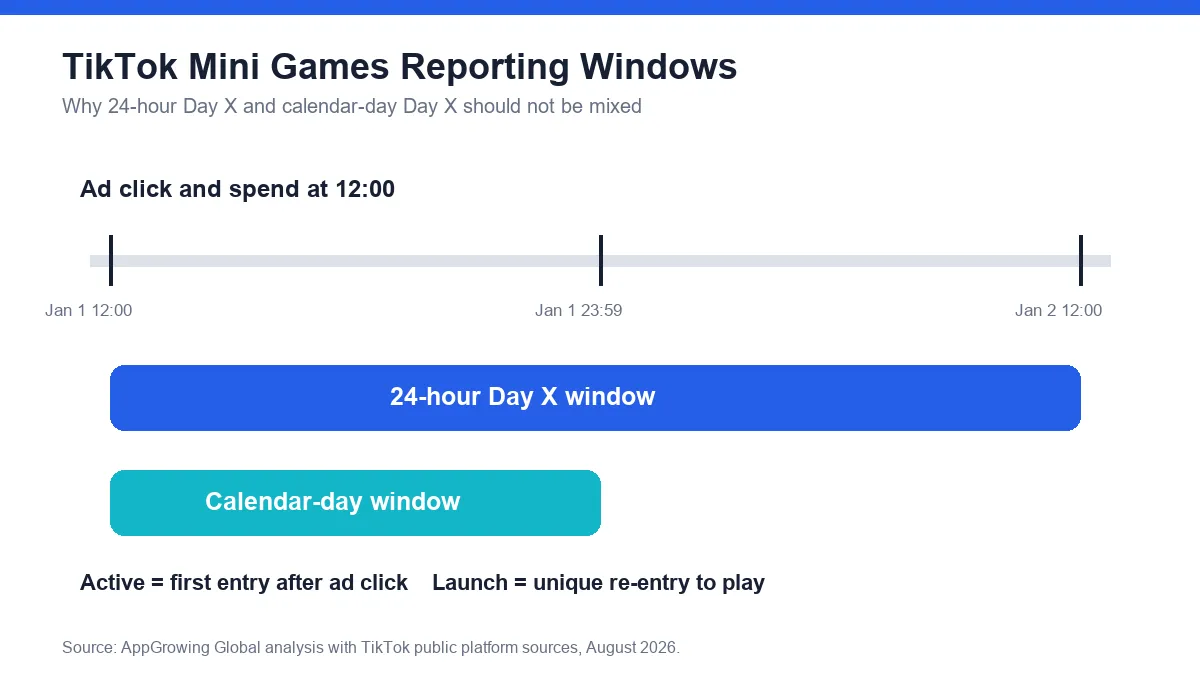
TikTok defines Active as a unique user who clicks an ad and enters the TikTok Minis game for the first time. It is the closest official reporting field to the first onsite game entry generated after an ad click. Launch is a unique user who re-enters the TikTok Minis game to play again.
Place the two fields next to each other because they describe different parts of the experience. Active helps the team inspect acquisition entry. Launch helps the team inspect return behavior. If Active grows while Launch remains weak, the next review should focus on the first session, exit points, and re-entry path before changing the bid.
Why are there two Day X ROAS windows?
TikTok's reporting page lists paid and organic Day X ad-revenue ROAS and paid and organic calendar-day X ad-revenue ROAS. The Day X field uses a 24-hour window. The calendar-day field ends at 11:59 p.m. according to the advertiser's TikTok Ads Manager account time zone.
TikTok gives a concrete example. For ad spend at noon on January 1, the 24-hour window includes conversions until noon on January 2. The calendar-day window includes conversions only until 11:59 p.m. on January 1. Those windows cover different amounts of time, so a team should not combine them in one trend line or benchmark.
How should a custom reporting view be built?
Open the Campaigns tab in TikTok Ads Manager and select Custom table. In Custom columns, open Conversions and then TikTok. Add Active, Launch, the paid and organic Day X ad-revenue ROAS fields, and the corresponding calendar-day fields that the team needs. Confirm the view and give it a name that includes market, account time zone, and window type.
Use one window per operating dashboard. If finance or product needs both views, create two separate tables and label each meeting export. Also preserve the reporting cutoff time. A result captured before the full 24-hour window closes should not be compared with a fully matured result from another day.
Keep paid and organic wording intact. Do not silently rename the field as paid-only ROAS if the official column combines paid and organic advertising revenue. The label protects the business meaning of the number.
How can teams turn the fields into a diagnosis?
Use a three-layer decision rule. If Active is weak, inspect the creative-to-game entry path, destination opening, and message continuity. If Active is healthy but Launch is weak, inspect the first-play experience, interruption points, and the reason to return. If Active and Launch are stable but ad-revenue ROAS is weak, inspect ad opportunities, rewarded-ad design, revenue-event postback, and the chosen window.
This framework does not prove causality by itself. It creates a review order that separates acquisition entry, return play, and monetization. Each layer should have an owner and a testable follow-up, so a reporting change becomes a product or campaign task instead of a general concern.
Add a maturity status to every report export. Mark a 24-hour result as incomplete until the full window closes, and compare it only after the same cutoff has passed for prior dates. If the account time zone, event definition, or revenue postback changes, begin a new reporting series from the change date rather than stitching incompatible rows into one trend. Keep a short change log beside the dashboard. This makes a sudden movement easier to separate into a real operating signal, a late-arriving value event, or a reporting-definition change before the team edits creative or bidding. Review the log in every weekly performance meeting.
Not sure whether your TikTok Mini Games dashboard is mixing entry, return, and ROAS windows?
Get a free benchmark check based on your specific app or game category.
The final dashboard should be small enough to explain in one minute. Show Active, Launch, one clearly named Day X ROAS window, account time zone, reporting cutoff, and the campaign's optimization mode. A clean definition sheet prevents the team from solving a window mismatch with a creative or bidding change.
